What Is A Dedicated Server And When Is It Time: A Friendly Guide For The Right Moment
In a digital environment where performance and reliability play a key role, dedicated servers are becoming increasingly important for companies that want full control over their online projects.
They allow users to use everything server resources without sharing with others, which achieves stability and security of work.
This type of hosting is especially useful for high-traffic sites, applications that require high performance, and business systems that must be available without interruption.
Understanding how to migrate to a dedicated server and which steps need to be carefully planned helps organizations avoid technical difficulties during migration.
Key notes
A dedicated server provides full control and stable performance.
Good preparation makes it easy to move to a new server without downtime.
Proper planning reduces risk and increases business efficiency.
Migrating to a dedicated server: the first step to more stable and faster hosting
Let's go one by one. business stability and continuity of services remain a key priority.
A transition occurs when the current infrastructure can no longer support business growth. CPU, RAM, storage and network resources, which makes them suitable for large sites, e-commerce and AI workloads.
An advantage
Description
Performance
Resources are available to one user only.
Security
Physical and virtual isolation from other clients.
Control
Complete freedom in configuring the server.
For a migration to be successful, teams typically plan every step – from data preparation to post-migration testing.
Pre-migration planning - How to switch seamlessly?
According to research by Gartner, more than 70% of failed IT migrations can be linked to a lack of detailed planning and testing before moving to a new environment
Moving to a dedicated server requires careful planning and precise preparation.
Assessment of the current hosting environment represents the first step.
Analyzing traffic patterns and peak times helps to understand performance and identify trouble spots, such as slow page loads or frequent system crashes.
The table below shows the key items to check during the assessment:
Element
What to check
Why it matters
Applications and databases
Versions, size, dependencies
Allows planning for compatibility with the new server
Traffic
Average number of users, peak loads
It helps to choose the appropriate configuration
Security settings
Firewall, SSL certificates, permissions
It ensures continuity of data protection
Performance
CPU load, RAM consumption, I/O speed
It detects bottlenecks that need to be removed before migration
When the state of the current system is known, it is easier to define the specifications of the new server.
Choosing the right server specifications involves more technical decisions. Intel Xeon or AMD EPYC with multiple cores and threads.
RAM directly affects the stability and speed of operation.
However, this is a bit of an outdated method, today SSD disks are becoming the absolute standard and NVME disks have also arrived, which are many times faster than an ordinary SSD disk.
A RAID configuration can increase system resilience.
Bandwidth or simply put, the AMOUNT OF INTERNET that the server can consume per month must be sufficient to support the expected traffic.
Operating system and control panel are also important elements. cPanel, Plesk or Webmin facilitate administration and reduce the risk of errors.
The next step is fabrication detailed migration plan.
On average, more than 60% of IT system migration projects go through a testing and adaptation phase before the final launch, in order to ensure full functionality in the new environment.
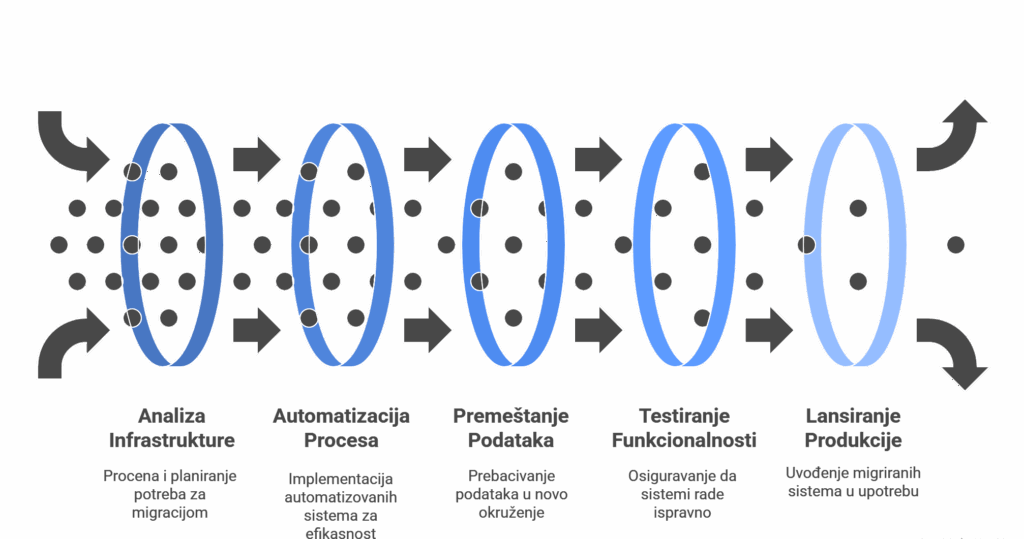
The stages of migration usually include:
Analysis and preparation of infrastructure.
Automation of processes where possible.
Physical or virtual data movement.
Functionality and performance testing.
Launching into a production environment.
Each phase should be clearly defined milestone points and persons responsible for their execution.
Roles and responsibilities they must be transparent.
Ako su uključeni eksterni partneri, kao što su hosting provajderi ili konsultanti, potrebno je jasno definisati njihove zadatke i rokove isporuke.
During the transition, the goal is minimize downtime.
Decreasing DNS TTL – before migration, the value should be reduced Time To Live parameter, thus accelerating the propagation of DNS changes.
Off-peak migration - performing the process during the night or weekend reduces the impact on users.
Using load balancing – a temporary load balancer or backup server can take over part of the traffic while the migration is in progress.
Transparent communication - notifying users via e-mail, banners or status pages reduces uncertainty and strengthens trust.
Establishment communication plan it is especially important in larger organizations.
WARNING: Do not migrate yourself if you haven't done it a thousand times, always consult an expert.
Organizations that have a clear communication plan during IT migrations reduce the risk of errors and downtime by as much as 60%
Backup and rollback plan they represent a safety net.
Example of a simple table for monitoring backup status:
Phase
Activity
Responsible person
Status
Preparation
Creating a complete copy of the database
IT administrator
Finished
Testing
File integrity check
DevOps Engineer
In progress
Return
System restore simulation
System engineer
Planned
Migration that relies on automated tools reduces the risk of human error. Ansible or Puppet, and continuous integration systems can speed up the process and ensure the consistency of the environment.
For organizations moving from shared hosting or VPS, moving to a dedicated server also means changing the way resources are managed. Zabbix or Prometheus enables real-time performance monitoring and quick response to problems.
Security must remain a priority throughout the process.
Once testing is complete and the results confirm stability, the transition to production can be done with minimal risk.
Migration to a dedicated server is not only a technical task but also an organizational process.
Careful planning, consistent communication and validated backups form the basis of any successful migration.
Need a high-performance dedicated server?
Dedicated servers can provide up to 99.99% uptime, reducing the risk of downtime and data loss, which is critical for e-commerce and large-scale applications
Organizations looking for maximum reliability, speed and control over their hosting environment are increasingly choosing dedicated servers.
This eliminates the risk of sharing performance with other clients and enables constant performance stability.
A dedicated server is the ideal choice for websites with high traffic, applications that require high processing power or companies that cannot afford downtime.
These measures allow the technical team more flexibility and reduce the risk of unforeseen problems.
Preparation and configuration of the new server
Before the migration can begin, the new server must be completely ready. Linux or Windows), necessary software (LAMP, MEAN and similar), as well as security patches.
Environment settings should be identical to the old server - including database versions, PHP configuration, libraries and extensions.
Safety is key.
Moving to a more modern server or cloud environment can reduce IT infrastructure maintenance costs by up to 30%, while simultaneously increasing the speed of data access and system stability.
Synchronization of live data
Data often changes between the test and production phases. rsync, Git and database replication they help in accurate data transmission and reduce the risk of information loss.
It is best to sync during periods of low traffic to avoid conflicts.
Updating DNS records and final migration
DNS propagation can take between 24 and 48 hours (rarely longer than that these days).
When everything is ready, the domain is directed to IP address new server.
Monitoring progress is possible with tools such as DNS Checker, which shows the status of updates worldwide.
Post-migration checks
After switching, detailed testing follows. CMS and integrations with external services such as payment systems or CRMs.
It should also be tested cron jobs, background processes and email functionality.
Email can sometimes be a complication, people often forget about this and notice that something is wrong only when they see that there are no emails at all for a day or two.
SSL certificates are a common point of failure, so you should check that HTTPS is active and valid.
Reviewing server and application logs can reveal problems that are not immediately apparent.
This final check ensures that the new server is running stable and secure.
Performance and traffic monitoring
Continuous performance monitoring can reduce system downtime by more than 40%, as it enables early detection and real-time problem resolution
After the site is back up and running, it's important to monitor key performance indicators: CPU load, memory, disk I/O and network traffic. New Relic, Nagios or Prometheus enable real-time monitoring and quick response to anomalies.
If there is a sudden increase in traffic or a decrease in speed, this may indicate technical problems.
They can be used to measure user experience and page loading speed Google PageSpeed Insights and GTmetrix.
User notification
When technical changes are inevitable, transparent communication with users creates trust.
Responding quickly to reported issues, such as login difficulties or form errors, shows professionalism and care for the user experience.
Key benefits
An advantage
Description
Performance
All resources dedicated to one user, without sharing with others.
Security
Full control over firewall, access and updates.
Scalability
The possibility of capacity expansion according to business needs.
Reliability
Minimal downtime and stable performance under load.
Control
Administrators have complete freedom in system configuration.
Additional recommendations
Regularly update the operating system and software.
Apply security patches immediately upon release.
Maintain automated backups at a separate location.
Test performance after each major configuration change.
Document all migration steps and configuration changes.
Conclusion
Migration to a new one dedicated server in India requires careful planning and consistent checking of every step.
Backup copies and rollback plan they are the basis of reliable migration.
Key recommendations:
Avoid last minute changes.
Invest in DDoS protection during and after migration.
Hire experts if the infrastructure has complex requirements.
Migration phase
Activities
The goal
Planning
Defining schedules and resources
Reduce the risk of errors
Testing
Multiple rehearsals on the staging system
Spot problems before moving
Implementation
Performance monitoring and DNS propagation
Ensure a stable transition
For companies with high traffic or sensitive data, an additional layer of security brings peace of mind and stability.
Tips for an easier transition:
Always test migration before production.
Monitor DNS propagation in real time.
Maintain up-to-date backups.
Frequently asked questions
What are the advantages of using a dedicated server compared to shared hosting?
Dedicated server offers complete control over resources, unlike shared hosting where CPU, RAM and disk space are shared with other users. Benefits include: More stable performance without sharing resources, Higher level of security and privacy, Ability to customize software and server configuration, Better support for demanding applications and sites with high traffic
How do I know if I need a dedicated server for my site or application?
It is required when a site or application overcome the limitations of shared or VPS hosting. Signs it's time to move: Frequent site crashes or slowdowns, Large number of visitors or complex applications, Need for specific configurations or software, Requirements for high data security
What to consider when choosing a dedicated server?
When choosing, the following factors should be analyzed: Processor (CPU) – Determines the speed of data processing;
What are the upgrade and scaling options with dedicated servers?
Most providers allow flexible upgrades of hardware components.
How does a dedicated server affect the performance and security of my online presence?
A dedicated server provides consistent performance, because all resources belong to only one user. firewalls, encryption and regular updates, which increases the level of protection and stability.
What are the main steps in the migration process?
Migration usually involves the following steps:
1. Assessment of needs - analysis of current resources and requirements. 2. Server Selection – choice of configuration and provider. 3. Preparing the environment - installation of the operating system and necessary software. 4. Data transfer – file migration, database and configuration. 5. Testing – functionality and performance check. 6. Domain Redirection – redirecting traffic to the new server.
Your privacy is important to us We use cookies to improve your browsing experience, deliver personalized ads or content, and analyze our traffic. cookie policy. By continuing to use the site and not selecting one of the options, you will be deemed to have opted out of the cookie policy
Functional cookies
Always active
Technical storage or access is strictly necessary for the legitimate purposes of enabling the use of a particular service that the subscriber or user has expressly requested, or solely for the purpose of transmitting communications via an electronic communications network.
Settings
Technical storage or access is necessary for the legitimate purpose of storing preferences not expressly requested by the subscriber or user.
Statistical cookies
The technical storage or access that is used exclusively for statistical purposes.Technical storage or access is required to create user profiles to send advertisements or track users on a website or across websites for similar marketing purposes.
Marketing cookies
Technical storage or access is necessary to create user profiles for the purpose of sending advertisements or tracking users on a website or across websites for similar marketing purposes.