 Skip to content

What is a URL: Basic Information and Significance
A URL, or uniform resource locator, is a type of universal identifier that allows access to information from remote computers, such as web servers and cloud storage.
The role of URLs in web navigation and communication is extremely important, as it enables structured retrieval and access to various online resources.
URL optimization can significantly improve the user experience and improve the SEO performance of the site, which contributes to better ranking on search engines (browser).
To summarize
- A URL provides access and navigation to web resources.
- The URL structure includes the protocol, domain, and path.
- An optimized URL improves SEO and user experience.
What is a URL?
A URL is an address on the Internet that is used to direct users to specific resources such as web pages, images, or documents. like domain, road and protocol. Na primer, „https://primer.com/sadrzaj“ pokazuje strukturu URL-a. URLs koriste protokole kao što su HTTP or HTTPS to ensure communication between the server and the browser.
Example URL
An example of a common URL is https://www.truefalsehosting.rs/, which when entered in the address bar, the browser takes users directly to the home page of the website. https://www.microsoft.com/ or https://www.linux.org/.
To make URLs more specific, an additional path can be added. /blog/ is the path that takes the user to the page Blog, while blog/5-tips-how-to-choose-the-right-web-hosting the full URL to the article 5 tips on how to choose the right web hosting on the platform True-False Hosting Blog.
Users can also use URLs to navigate to specific sections of the website, such as https://truefalsehosting.rs/blog/5-saveta-kako-izabrati-pravi-veb-hosting#:~:text=Dodatnidomenipoddomeniibazepodataka which leads directly to the sixth, final section of tips in the article.
Each image uploaded to the server is given a unique URL, allowing users to directly access that image. https://truefalsehosting.rs/wp-content/uploads/2024/04/no-image.png leads to a specific image associated with said article.
URL structure
HTTP or HTTPS
HTTP (Hypertext Transfer Protocol) and HTTPS (Hypertext Transfer Protocol Secure) are protocols for network communication between web server and browsers.
HTTPS adds a security component by encrypting data, which is key to protecting websites and improving SEO ranking.
Important: Browsers also support other protocols such as FTP for file sharing and mailto for e-mail addresses.
www (Subdomain)
A subdomain is the URL element that appears before the first dot in the address. is www, koja označava prisustvo sajta na internetu putem HTTP protokola. Vlasnici sajtova mogu koristiti različite reči za organizaciju sadržaja, kao što su „blog“ ili „news“.
Domain name
A domain name is an address that users enter into a browser to access a site, such as truefalsehosting.rs.
Domain extension
Also known as a top-level domain (TLD), the extension is the part of the URL that comes after the domain name. .com, used on about 53% of all sites.
| TLD type | Description | Examples |
|---|---|---|
| General TLD (gTLD) | Includes popular extensions. | .com, .org, .net |
| Country Domain (ccTLD) | Designation for countries or territories. | .mx, .in, .at |
| Sponsored TLD (sTLD) | They are used for specific organizations. | .travel, .asia |
| New gTLD (nTLD) | Extensions launched after 2012. | .online, .store, .tech |
Path to resources
The resource path is the part of the URL that follows the TLD and is often denoted as the directory structure of the site.
Parameters
Parameters, known as query strings or URL variables, are found after the question mark in the URL.
- Translation: The country code translates the page into the appropriate language.
- Search: The search parameter returns results from the site's internal search engine.
- Filtering: Used to separate fields such as theme, color, and price.
- Paging: It allows content sorting, especially for e-commerce.
- Tracking: It usually contains UTM codes to track traffic from marketing campaigns.
What is URL Syntax
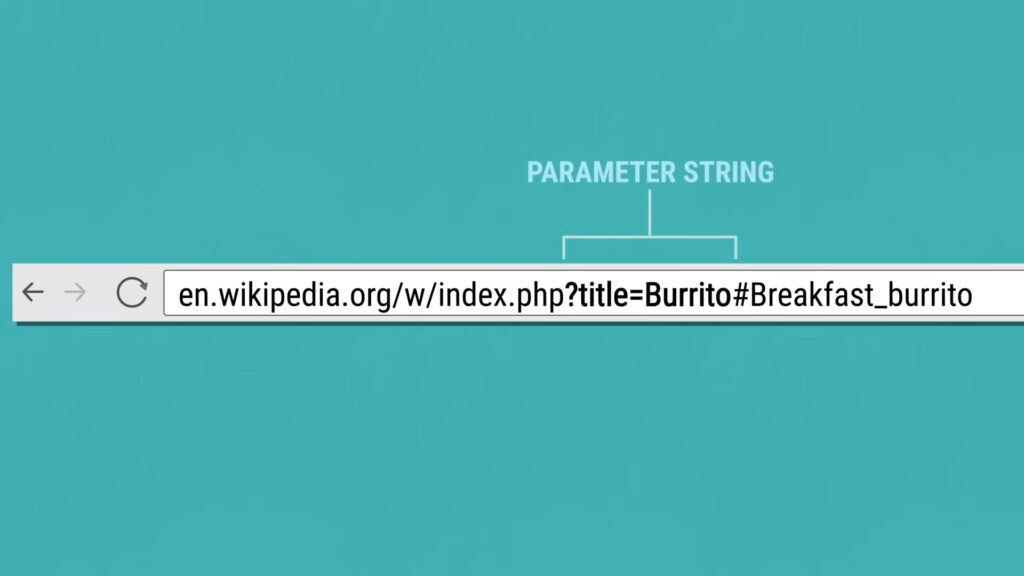
The URL syntax represents the rules which define the allowed components and symbols within a URL.
http://poddomen.naziv-domen.ekstenzija-domen/putanja-do-resursa?parametri
URLs can only contain numbers, letters and special characters like ()!$-‘_*+.
In addition, URLs have the ability to include connection anchors, poznatih i kao „page jump“ ili „fragment identifier“. Ovi elementi su predstavljeni znakom #, which marks a specific section within the resource.
What are the different types of URLs
URLs serve as addresses on the Internet, providing access to various resources. Absolute URL it contains all the details, including the protocol, domain, and path to the resource. Relative URL, unlike absolute, only includes the path to the resource, relying on the current domain as a reference.
Canonical URLs are useful for owners of sites with duplicate content. Return URLs refer to the destination to which the user returns after completing the process on the external system.
Beautified URLs, also known as custom short URLs, are easy-to-remember web addresses. Bitly, Short.io, i TinyURL allow the creation of these short addresses that improve the user experience and facilitate the sharing of information.
Where is the URL
On computers, the URL is always displayed in address bar at the top of the browser window.
How to Open URL

Opening a URL can be done in several convenient ways. Manual entry URL address in browser address bar is the basic method. Enter.
Users often use hyperlinks, which are usually highlighted or underlined text links, images, or icons.
QR codes are another current way of opening URLs. Copying and pasting URLs will allow quick access to a web page when a hyperlink or QR code is not an option. 75% of people use smartphones to scan.
How to Create a URL
Creating a unique URL such as example.com or mywebsite.org it starts with choosing and registering an appropriate domain name. Google Domains, CloudFlare and Domain.com are among the most popular choices.
Here are instructions on how to buy a domain:
- Check name availability. First, run a check with the domain checker. Search.
- Proceed to payment. You choose the registration period.
- Complete the registration process. After the payment is approved, the authorized registrars will require you to fill out a form with your name, email address, and contact information.
- Verify name ownership. In the email you provided for registration, a verification link should arrive a few minutes after the process is complete.
- Expiry date tracking. Domain registrants must be mindful of expiration dates and be timely renew domains in order to retain rights over them.
It is important to note that a well-chosen domain name is the key to recognition on the Internet, and the complexity of the registration process can be reduced through clearly defined steps and planning.
Final Part
A Uniform Resource Locator (URL) is a complete Internet address that points to a specific file on the Internet.
- HTTP or HTTPS: This communication network link connects web servers and browsers.
- www: Known as the subdomain, this part comes before the first dot in the URL.
- Domain name: This is the site address that users type into their browsers to access the site.
- Domain extension: The part that follows the domain name, such as .com or .org.
- Path to resource: Separated by a forward slash (/), this element adds additional information to the site address.
- Parameters: Often called query strings or URL variables, parameters are marked with a question mark (?).
To create and modify the site's URL, it is necessary to register the domain with a trusted registry. hosting service provider which offers a registration service.
Is a URL the Same as an IP Address or a Web Address?
URL, IP address and web address are different terms:
- IP address is a string of numbers that points to a computer or server on a network.
- A web address, also known as a domain, is an easier-to-remember replacement for an IP address, allowing users to easily get to the site they want.
truefalsehosting.rsis the domain name and represents the full URL to the main page of the site.https://truefalsehosting.rs/blog/koliko-kosta-domen-vodic-za-odabir-i-registracijuje potpuni URL za određeni članak pod nazivom „Koliko košta domen?“.
Frequently asked questions
How can I find my URL?
The URL is usually found in your web browser's address bar at the top of the window. https://www.primersajt.com/stranica.
Is the email address a URL?
Email address is not a URL. E-mail addresses are identifiers for sending messages through the email system, while the URL serves as an address for locating resources on the Internet. neko@primer.com is an e-mail address.
What does it mean when looking for a URL?
When looking for a URL, most often it means website location or other resource available online.
What is the difference between a URL and a URI?
Although URL and URI are often used synonymously, there is a difference. url (Uniform Resource Locator) provides information about the location of the resource and how to access it. URRI (Uniform Resource Identifier) means a generic identifier that may or may not include a path to the resource. SoftwareLab page for further details on the differences.
Where is a URL usually found on a website?
The URL must be displayed in the address bar of the web browser.
What is an example of a URL?
One basic example of a URL is https://www.google.com. https://www.primer.com/proizvod?id=123.
How to Block a URL?
By modifying the hosts file. You can redirect a domain name to a local IP address to block access to a specific site.
By using a Google Chrome extension. Windows and Mac users can install plugins like BlockSite.
By installing site blockers on iOS and Android devices. After installation, users can add sites and apps to their block list by simply adding them.
By using the built-in parental controls. In Windows 10, parents can create an account for their child and set a list of blocked sites.